How AI Agents Work: Tools, Memory, and Planning Explained
Learn how AI agents combine LLM reasoning, JSON tool calling, short- and long-term memory, and ReAct loops to complete multi-step tasks safely.
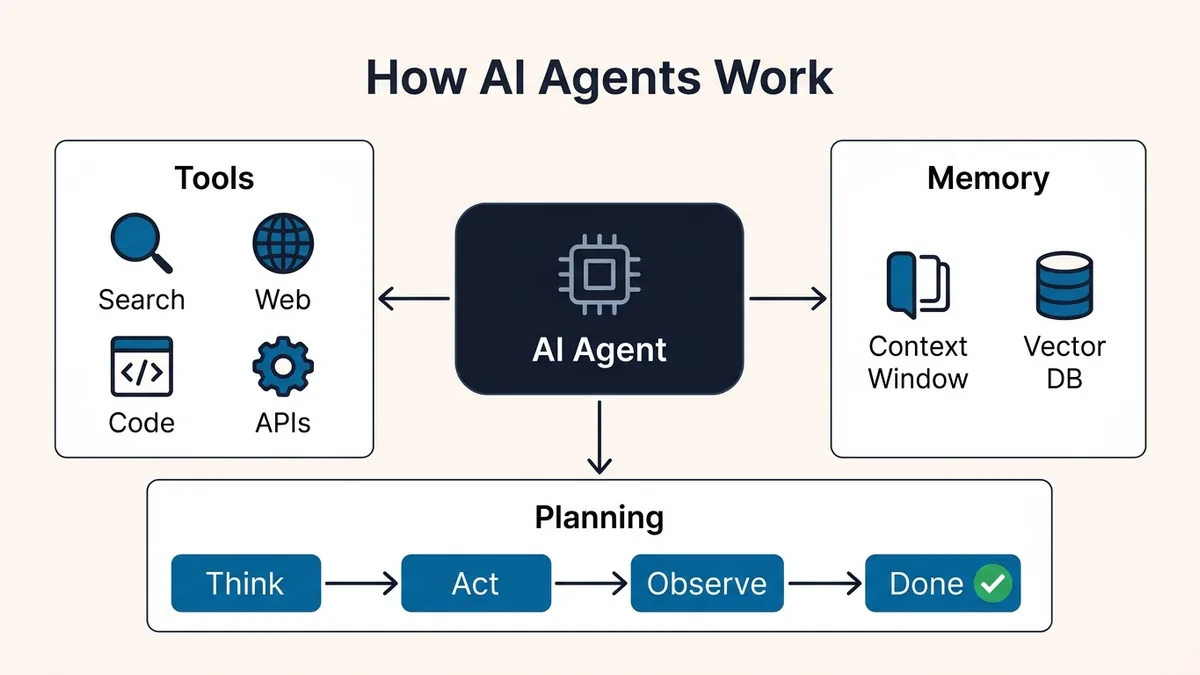
An AI agent is a software system that pairs a Large Language Model (LLM) with external tools, working memory, and a repeating control loop (Perceive → Plan → Act → Observe) so the model can decompose goals, execute real actions, and self-correct until a task is finished.
Unlike a single-turn chatbot, an autonomous agent treats the LLM as a reasoning component inside a runtime loop—trading higher token usage and latency for dynamic problem solving.
4 Pillars
Common Core Modules
LLM + Tools + Memory + Control Loop
5x–18x*
Illustrative Token Range
Depends on depth, context, tools & caching
ReAct
Foundational Loop Pattern
Interleaved Thought & Action traces
Standard Chatbot vs. Workflow vs. Autonomous AI Agent
Teams frequently confuse prompted chatbots, deterministic workflows, and autonomous AI agents. In Anthropic's engineering guide on building effective agents, workflows are defined as systems where LLMs and tools are orchestrated through predefined code paths, whereas agents let the model dynamically direct its own processes and tool usage.
| Attribute | Passive LLM Chatbot | Workflow Automation | Autonomous AI Agent |
|---|---|---|---|
| Control Flow | Single prompt → single reply | Predefined DAG or code pipeline | Dynamic Think → Act → Observe loop |
| External Actions | None (text generation only) | Fixed API steps defined by developer | Model selects tools & JSON arguments at runtime |
| State & Memory | Chat transcript in context | Explicit variables passed between steps | Working context + optional persistent store |
| Error Recovery | Stops and asks the user | Retries or fails via try/catch | Reads error output, adjusts plan, and retries |
| Token Cost & Latency | 1x baseline (hundreds of ms) | Predictable (fixed multi-call pipeline) | Variable (depends on loop depth, outputs & caching) |
| Best Use Case | Drafting, Q&A, summarization | Invoices, CI pipelines, fixed ETL | Debugging code, deep research, multi-app ops |
The 4 Core Pillars of AI Agent Architecture
Most common agent architectures—whether built with raw API calls, LangGraph, or an IDE assistant—assemble the same four core components, though exact implementations vary by framework and workload. In the system diagram below, those four pillars are coordinated by a fifth orchestration layer—the Execution Runtime—which enforces schemas, step limits, and the observation loop.
1. Reasoning Engine (The LLM)
The LLM acts as the decision-making kernel. Rather than generating prose for a human reader on every turn, the model evaluates the current state and decides between two outputs: emit a structured tool call or return the final answer. Frontier reasoning models and capable open-weight models (which you can test locally via our guide on running local AI models on your laptop) work well here when they follow JSON schemas reliably.
2. Tool Use (Function Calling)
An LLM cannot query a live PostgreSQL table, read a local file, or check HTTP status codes on its own. Tool calling bridges this gap by passing a registry of JSON Schema tool definitions alongside the prompt. When the model needs external data, it pauses text generation and outputs a structured function name and argument payload; the host runtime executes that function inside a sandbox and returns the result.
3. Short-Term and Long-Term Memory
- Short-term (working) memory: The active context window containing the system instructions, user goal, prior tool calls, and tool outputs from the current run.
- Long-term (persistent) memory: Optional external storage retrieved across sessions. Not every agent needs a persistent vector database—many production systems use ordinary SQL tables, flat Markdown or JSON files, rolling conversation summaries, or no long-term memory at all.
4. Planning Loops (ReAct vs. Plan-and-Execute)
Introduced by Yao et al. in ReAct: Synergizing Reasoning and Acting in Language Models (arXiv:2210.03629), the ReAct loop interleaves verbal reasoning (Thought) with task-specific actions (Action) and environment feedback (Observation). In their evaluation across HotpotQA, FEVER, ALFWorld, and WebShop, grounding reasoning steps with external tool observations helped reduce unsupported claims and error propagation compared with ungrounded Chain-of-Thought prompting alone.
For longer tasks, engineers often pair ReAct with Plan-and-Execute: a planner model writes a numbered checklist first, and smaller worker loops execute each step independently before updating the plan.
Inside the Agent Execution Loop (Step-by-Step Trace)
Below is the step-by-step control cycle a runtime executes from the moment a user submits a request until the agent exits.
Suppose a developer asks an operations agent: "Check why the staging API returned 502 errors in the last hour and open a GitHub issue if a container crashed."
Step 1: Perceive & Initialize State
The runtime constructs the initial prompt payload: system rules, available tool schemas (fetch_logs, inspect_container, create_github_issue), and the user's goal.
Step 2: Select an Action & Emit a Structured Tool Call
The model recognizes it lacks live telemetry, so it outputs a structured JSON tool call rather than guessing. Notice that production applications generally record a brief rationale summary for audit logs rather than exposing a model's private internal reasoning:
{
  "rationale": "Inspect the last 60 minutes of staging API logs for HTTP 502 responses.",
  "tool_call": {
    "id": "call_01H9X",
    "name": "fetch_logs",
    "arguments": {
      "service": "staging-api",
      "status_code": 502,
      "window_minutes": 60
    }
  }
}
Step 3: Execute & Observe Output
Your host application validates the JSON arguments, runs fetch_logs against your logging backend, and appends the response back into the conversation as a tool message (for example: OOMKilled: container exited with code 137 at 10:14 UTC).
Step 4: Iterate or Return Final Answer
On the next loop turn, the LLM observes exit code 137 (OOMKilled), decides it now has enough evidence, calls create_github_issue with the stack trace, observes the created issue URL, and finally exits the loop with a concise summary for the user.
Simplified Python Agent Loop Example
In code, the core control loop looks like a bounded loop over an allowlisted tool registry (MAX_STEPS prevents runaway execution).
Simplified pseudocode: The exact response and tool-call structures depend on the LLM provider's API. Production implementations also need tool allowlisting, exception handling, timeouts, output validation, and execution isolation.
MAX_STEPS = 8
TOOLS = {
    "fetch_logs": fetch_logs,
    "create_github_issue": create_github_issue,
}

def run_agent(user_goal: str) -> str:
    messages = [{"role": "user", "content": user_goal}]

    for step in range(MAX_STEPS):
        response = llm.generate(messages=messages, tools=list(TOOLS.keys()))

        if not response.tool_call:
            return response.final_text  # Exit loop with final answer

        tool_name = response.tool_call.name
        if tool_name not in TOOLS:
            raise ValueError(f"Blocked unknown tool: {tool_name}")

        args = validate_args(tool_name, response.tool_call.arguments)
        observation = TOOLS[tool_name](**args)

        messages.append({"role": "assistant", "tool_call": response.tool_call})
        messages.append({"role": "tool", "name": tool_name, "content": str(observation)})

    raise RuntimeError(f"Agent exceeded MAX_STEPS ({MAX_STEPS}) without finishing.")
Tool execution should also enforce per-tool permissions, timeouts, output-size limits, and approval requirements for sensitive operations.
Why Agent Loops Multiply Token Usage and Latency
Because standard LLM APIs are stateless, each step in an uncached agent loop typically resends the accumulated conversation context (system prompt + tool schemas + prior tool calls and observations). However, prompt caching (which discounts repeated static prefixes) and provider-specific billing models can significantly change actual cost.
Here is the exact arithmetic behind the 5-turn (7,200 tokens = 6x) estimate above, assuming a 1,200-token initial request (1,000-token system/tool prefix + 200-token goal) and 50-token tool calls/outputs without prompt caching:
| Turn | What Is Sent & Generated | Tokens Used in Turn | Cumulative Total |
|---|---|---|---|
| Turn 1 | Prefix + goal (1,200 in) + Tool Call #1 (50 out) | 1,250 | 1,250 |
| Turn 2 | Prior context (1,250) + Tool Output #1 (50) + Tool Call #2 (50 out) | 1,350 | 2,600 |
| Turn 3 | Prior context (1,350) + Tool Output #2 (50) + Tool Call #3 (50 out) | 1,450 | 4,050 |
| Turn 4 | Prior context (1,450) + Tool Output #3 (50) + Verification (50 out) | 1,550 | 5,600 |
| Turn 5 | Prior context (1,550) + Final synthesis (50 out) | 1,600 | 7,200 (6x) |
To control costs in production, enable prompt caching for static system prompts and tool schemas, truncate verbose tool outputs (such as raw HTML or 500-line logs) before appending them to context, and enforce a strict max_steps ceiling. If you are building solo on a tight budget, pair lean agent loops with the zero-cost stack options in our free developer tools for solo builders and free AI coding assistants guides.
Multi-Agent Orchestration Patterns
When a single agent accumulates a large toolset (for example, 15–20+ tools) and competing instructions, splitting work across specialized agents can improve task organization and evaluation—though it adds coordination overhead and does not automatically improve accuracy. As Anthropic's orchestrator-workers pattern demonstrates, delegating focused subtasks keeps each model call narrower and easier to evaluate.
| Pattern | How It Works | Strengths | Trade-Offs |
|---|---|---|---|
| Supervisor / Orchestrator | One lead agent delegates subtasks to specialized worker agents and synthesizes results | Clear ownership, easy to enforce budgets and permissions | Extra coordination hops add latency |
| Sequential Handoff | Agent A finishes triage and passes state directly to Agent B (e.g., Researcher → Writer) | Simple state machine, clean prompt separation | Early mistakes propagate downstream |
| Parallel Swarm | Multiple agents inspect independent files or angles simultaneously and report back | Fast wall-clock speed on large codebases or audits | Higher peak token burst; requires merge logic |
Common Failure Modes & Agent Security Checklist
- Infinite Retry Loops: If an API returns
403 Forbidden, an unguarded agent may retry identical arguments repeatedly. Fix: Capmax_iterations(such as8–15steps as an illustrative starting cap, depending on task complexity), track repeated identical tool calls, and abort early with a diagnostic message. - Context Window Overflow ("Lost in the Middle"): Dumping raw 50 KB logs into short-term memory degrades reasoning accuracy. Fix: Summarize or slice tool results to the relevant lines before returning them to the model.
- Hallucinated Tool Parameters: Models occasionally invent optional flags or malformed IDs. Fix: Keep tool interfaces narrow, use descriptive enum values, and return clear validation errors so the agent can self-correct on the next turn.
- Indirect Prompt Injection: Untrusted web pages or tickets read by a tool can contain hidden instructions trying to hijack the agent's next tool call. Fix: Separate data from instructions, sanitize fetched content, and gate sensitive tools behind explicit approval hooks.
Frequently Asked Questions
What is the difference between an AI agent and a normal LLM?
A normal LLM generates text in a single pass from a prompt and stops. An AI agent wraps that LLM in a control loop with tool definitions and memory so it can fetch live data, execute code or API calls, inspect errors, and take multiple steps autonomously.
What is the ReAct framework in AI agents?
ReAct (Reasoning + Acting) is an agent research pattern introduced by Yao et al. where a model interleaves a reasoning trace (Thought), an external tool call (Action), and tool feedback (Observation) before deciding its next move. In production applications, teams typically log concise action summaries (rationale) rather than exposing private internal reasoning.
Do AI agents require LangChain or a heavy framework?
No, especially for prototypes. A small while loop over a model's native tool-calling API is enough for a prototype or narrow internal script, whereas production deployments require retries, structured logging/monitoring, permission boundaries, evaluation tests, and error handling—whether you build them yourself or adopt an orchestration framework.
Can you run AI agents locally without paying API fees?
Yes, depending on your hardware and workload. Runtimes such as Ollama and LM Studio expose local OpenAI-compatible endpoints for open-weight models (like Qwen and Llama), though reliable tool calling depends on both the specific model and runtime support. Memory requirements also vary by parameter count, quantization level (such as Q4_K_M), context length, and GPU/unified memory bandwidth—small 3B–7B quantized models can run on 8–16 GB machines, while larger models need more RAM/VRAM. For a complete installation walkthrough, follow our free guide to running local AI models on your laptop.
Primary References
- ReAct: Synergizing Reasoning and Acting in Language Models (arXiv:2210.03629) — Yao et al. (2022) foundational paper on interleaved reasoning and tool actions
- Building Effective Agents — Anthropic Engineering — Workflows vs. autonomous agents and orchestrator-worker patterns
- Ollama Documentation — Local OpenAI-compatible API and tool-calling runtime
- LM Studio Documentation — Local server and open-weight model execution
Was this guide useful?
Quick feedback helps keep our guides accurate and up to date.